Atom and RSS feeds as a preview
I developed the new "Feed Teasers" plugin for Grav because the CMS I am currently using lacked a feature I had previously employed on my WordPress blog to highlight or link to news from other websites. Back then, security alerts from Heise Security and the Tagesschau news feed were prominently displayed on the blog's homepage. Here, I also use this option to link to the latest posts from this blog on the homepage.
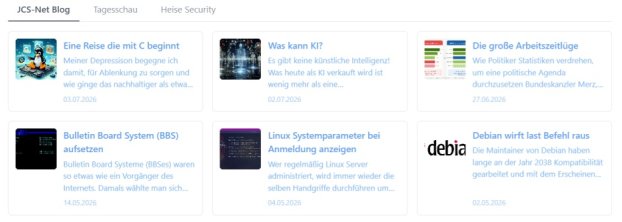
Feed Teasers displays posts from external RSS or Atom feeds as clickable teaser tiles (featuring a thumbnail, title, and excerpt). If multiple feeds are configured, users can optionally switch between them using tabs. Clicking a tile opens the original article in a new browser tab. The plugin requires no external PHP dependencies; RSS/Atom parsing is handled entirely by built-in PHP functions (SimpleXMLElement, cURL, or a stream context as a fallback). This keeps the plugin lightweight and allows it to be installed and updated via standard Grav methods.
Configuration
The plugin is configured via the admin panel and is divided into two sections accessible via tabs.
General
- Cache duration (seconds)
- The plugin fetches the configured feeds and caches them locally for a specified number of seconds before fetching the feed again.
- Default setting: 1800 seconds (30 minutes)
- Posts per feed
- Number of posts from the feed to be displayed.
- Default setting: 6 posts
- Excerpt length (characters)
- Number of characters to display as the excerpt per post.
- Default setting: 180 characters
- Minimum tile width (CSS value, e.g., 260px)
- Indirectly determines how many tiles fit per row. Smaller value = more tiles side-by-side.
- Default setting: 260px (pixels)
- HTTP timeout (seconds)
- Time limit within which a feed must return a result before the request is aborted.
- Default setting: 8 seconds
- Show tabs (for multiple feeds)
- Determines whether tabs are displayed to switch between multiple feeds when more than one is configured.
- Default setting: Yes
- Fallback teaser image
- Path, absolute URL, or Grav stream (e.g., plugin://feedteasers/images/fallback.png, theme://images/eigenes-bild.jpg). Leave blank for no fallback image.
- Default setting: plugin://feedteasers/images/fallback.png
Feeds
The plugin includes a sample feed for demonstration purposes; this should be deleted once you have added your own feeds. To add an additional Atom/RSS feed, click the + Add Item button at the bottom and fill in the two fields:
- Display Name
- The display name appears on the tab (if tabs have been enabled).
- Feed URL (RSS or Atom)
- The address from which the feed can be retrieved.
Feeds that have already been configured can be edited or deleted here.
Development
Since I wanted to offer the plugin via the GPM repository's built-in mechanism—making it installable through the Admin plugin and via bin/gpm install feedteasers — and because the company behind the open-source CMS (Trilby Media) requires a GitHub repository for automatic distribution, I opted for a somewhat more comprehensive version control setup.
Version Control
Feed Teasers is managed on Codeberg; incoming pushes are immediately mirrored to GitHub, where Grav monitors for new releases and makes them available for installation or update within an hour. I won’t bore you with the technical implementation details here, but anyone interested is welcome to contact me on the Fediverse.

Interessiert am ehrlichen Austausch, kein autofollow. Ungeschminkt, manchmal schmerzhaft. 🇪🇺 🇺🇳
#notjustsad
💜
Contributing
If you would like to get involved in the development of Feed Teasers, please check the repository's CONTRIBUTING.md file. You can also help translate the configuration interface.
Feel free to discuss this post with me on the Fediverse.